
You know the nightmare. The fog machines are pumping, the Friday night crowd is surging, and right at the front of the queue, one guest is squinting at their phone trying to sign a liability waiver while hundreds of people behind them groan like the undead. Your front-of-house crew is stretched thin…and the line isn’t getting any shorter.
Here’s the truth: a slow entry line usually isn’t a scanning problem. It’s a bottleneck problem. A handful of guests need extra help at the gate, and your team only has so many hands to triage and troubleshoot while keeping the scares moving.
The good news? You can exorcise those entry bottlenecks without adding a single body to your payroll. Here are four ways to get guests out of the queue and into the terror faster.
1. Let Guests Check Themselves In
We recently unleashed a new Kiosk Mode on HauntPay, allowing you to set up multiple devices dedicated strictly to check-in. Guests walk up, scan themselves in, and keep moving toward the madness. Because the devices are locked into check-in mode, there’s nothing else on the screen for guests to accidentally tap into or get lost in.
The real magic is what this does for your staffing. Instead of tying one team member to a single scanner, one staffer can keep an eye on three or more kiosk devices at once. That’s way more guests moving through your gates per hour with the exact same crew.
Kiosk Mode is a lifesaver on peak October weekends when timed-entry waves hit all at once. Pro-tip: Set your kiosk stations up in a spot where one front-of-house crew member has a clear line of sight to all of them at once.
Want the step-by-step walkthrough? Check out our help article on enabling Kiosk Mode.
2. Banish Waiver Signing to a Separate Line
If your haunt requires guests to sign a waiver before entering, you know they can be a line-killer. And not in a good way. If a guest has to stop and sign at your main check-in station, that lane is completely dead in the water until they finish…and everyone behind them gets restless.
We’ve rolled out two killer updates to keep your main line moving:
- Waiver emails for at-the-door sales: Instead of handing over your box office screen, the guest gets an instant email and signs on their own device.
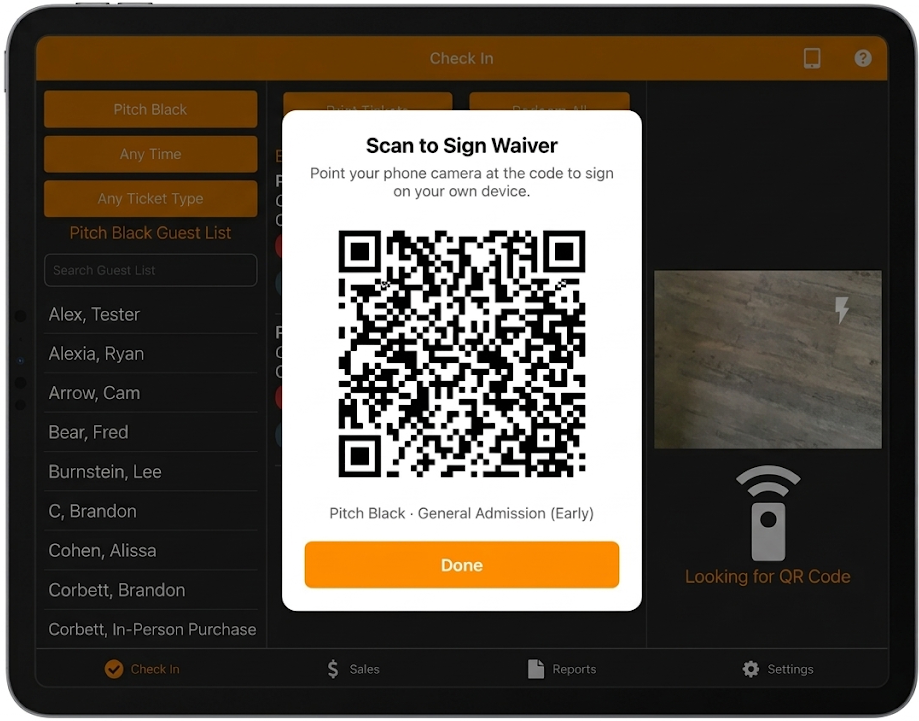
- QR code signing: After you sell or scan a ticket with an unsigned waiver, a QR code pops up right on your screen. The guest scans it to pull up the waiver on their own phone.
Either way, the unsigned guest steps out of the way to complete their paperwork, and the next victim…er, guest…steps right up. Your scanning lanes stay wide open for the folks who are ready to enter.
3. Get Waivers Signed Before They Even Leave the House
The easiest way to keep your gate moving is to kill the problem before guests ever step foot on your property. With HauntPay, you can turn on automatic waiver reminders that go out to ticket holders who still have unsigned waivers attached to their order.
Fewer unsigned waivers in the queue means fewer slowdowns at your front gate. Pro-tip: Turn your automated reminders on well ahead of opening night so guests have plenty of time to handle it from their couch.
(Not sure what your attraction’s paperwork should cover? Check out our guide on haunted house waivers and registration forms to make sure you’re protected.)
4. Make Unsigned Waivers Impossible to Miss
Even with reminders, someone is bound to show up on a busy Saturday night without signing their waiver. And that’s totally fine! What matters is how fast your gate crew catches it.
When you scan a ticket in our app, the waiver status text is now much larger and fully color-coded so your team knows at a glance whether a guest is cleared to enter. No squinting in the dark, no digging through menus: your crew can immediately point unsigned guests straight to the QR code station instead of holding up the line.

Bonus: Set Expectations with Color-Coded Time Slots
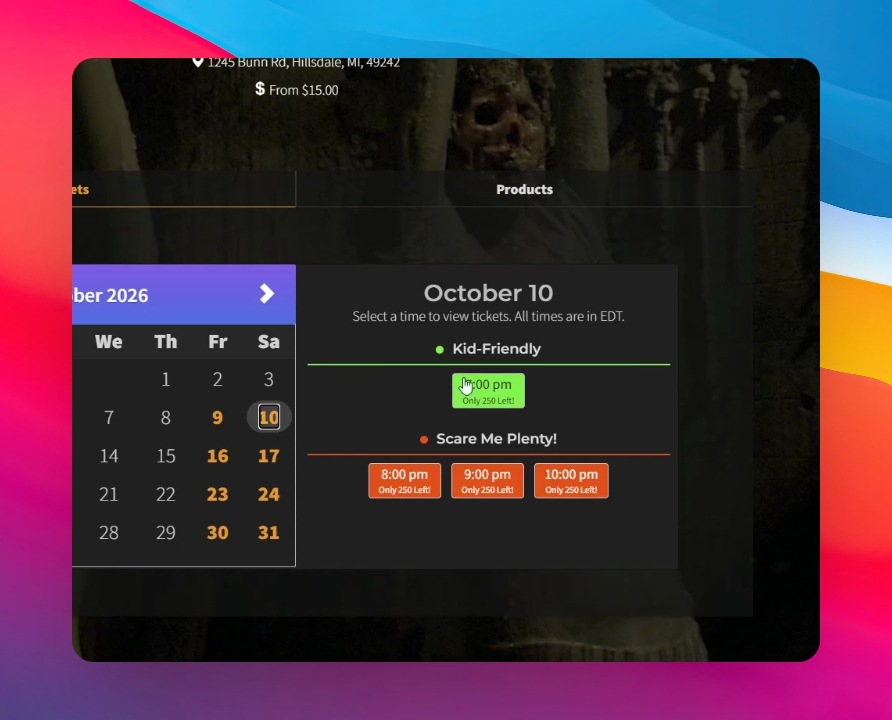
While this won’t speed up your scanners on its own, it stops confusion before guests ever arrive at your box office. You can now add color-coded labels to your event’s time slots to highlight major differences, like standard timed entry, VIP fast-pass waves, lights-on matinees, or late-night blackout sessions. Check out our help article on color-coded time slots to see how to set it up.
Your Pre-Season Gate Checklist
Want to make sure your front gate is dead-simple to run before opening night? Save this quick checklist:
- Set up your Kiosk Mode devices and run a quick test with your crew
- Flip on automatic waiver reminders for your season events
- Test the QR code signing flow on your own phone so you know exactly what guests will see
- Walk your gate staff through the new color-coded waiver alerts on the scan screen
Need a hand getting dialed in before the crowds descend next season? Hit us up in the live chat or schedule a call with our support team. We’d love to help you get set up for next season!