
Are we still sharing passwords in 2026?
Honestly, no judgment here. We know how it goes. When the sun sets, the fog machines start pumping, and a line of eager souls is snaking around your property, you’re in survival mode.
In the heat of the moment, it feels easier to just type your master password into every volunteer’s phone or tablet to get the line moving. But beware: operating your entire haunt under a single login is like giving every zombie and ghoul in your crew the master key to the counting room.
At HauntPay, we built Employee Account capabilities right into your dashboard to help you escape the nightmare of shared logins. Here’s why giving your staff their own credentials is the best way to keep your attraction from turning into a real-life horror story.
1. Account Security: Don’t Let Your Data Rest in Peace
When everyone logs in as an admin, they have the power to see your sales, your bank details, and the ability to accidentally delete an entire night’s worth of tickets.
Most of your seasonal monsters and volunteers don’t need to see your financial soul. They just need to scan a soul in…er, a ticket.
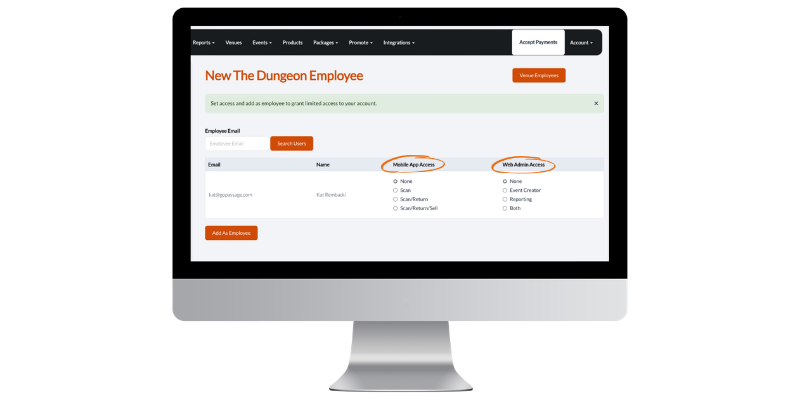
With HauntPay employee accounts, you can set ghoul-specific permissions for each member of your team:
- 📱 Scan Only: Perfect for the spirits at the front gate. They can redeem tickets, but they can’t see your reports or accidentally issue refunds.
- 🎟️ Scan/Return: For your “Lead Ghouls” or supervisors who might need to handle a guest recovery issue or unredeem a ticket.
- 🎁 Scan/Return/Sell: For the creatures lurking in the merch booth or the concessions stand. They can process sales without having access to your back-end event settings.
2. Clean Reporting: Unmasking Your Top Performers
If you check your reports at 2 a.m. and notice a discrepancy in a cash drawer, who do you haunt for answers? If everyone is using one account, your staff is just a blur of anonymous activity.
Individual logins create a digital paper trail. When your team uses their own accounts, your HauntPay reports act like a crystal ball, showing you exactly who processed every transaction. This is essential for:
- Reconciling the Till: See exactly which cashier was responsible for which drawer.
- Tracking “Kill” Rates (Sales): Want to know which merch seller is absolutely slaying it? Now you have the data to reward your top performers.
- Ghost-Hunting Errors: If a ticket issue pops up, you’ll know exactly which staff member was on the device at that time.
3. Scale Without the Screams
As your haunt grows from one small trail to a multi-attraction scream park, managing a single login becomes a logistical curse. Sessions time out, security alerts get triggered, and you spend more time acting as tech support than as the Master of Ceremonies.
Individual employee accounts allow your monsters to be autonomous. They log in, they do their jobs, and you stay in control of the big picture from your own dashboard…no exorcism required.
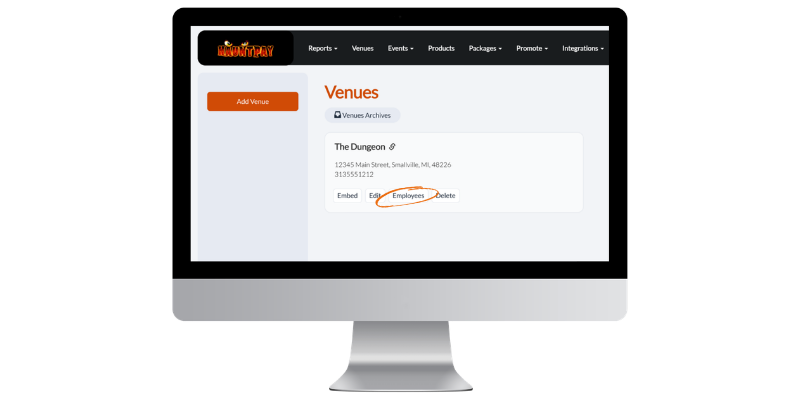
💡 Pro Tip: Faster Than a Jump Scare You might think adding employees will take an eternity. It won’t. Simply invite an employee via email, select their permission level, and they’re ready to go.
Check out our 1-minute guide on how to assign venue employees here.
Final Thoughts
Sharing a password might feel like a shortcut, but it’s a trap. By utilizing Employee Accounts, you’re building a more secure, transparent, and professional attraction.
Stop being the password-typer-in-chief and start empowering your horde. Your peace of mind (and your bottom line) will thank you.
Ready to banish the shared password for good? Log in to your HauntPay dashboard to invite your first employee today!
